Before beginning your search Sign into the Library catalogue. For further information on how to Sign in, please refer to the Library Guide • Signing into the Library
In general, searches within the library catalogue (Primo) are not case sensitive, and all terms and words entered will be searched unless parenthesis, wildcards, special characters, or Boolean operators, such as AND OR Not are used.
- To begin a Simple search, enter the search terms you wish into the search box below.

- The default search is to search across Everything.
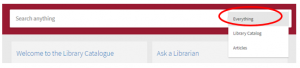
- Once you have entered your search terms click the search button to retrieve results.
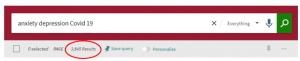
Note – If you enter several terms in the search box, you will retrieve results that contain all of the specified terms from across any field.
Note – Expand my Results.

Ticking this box will expand the search and retrieval results to include materials and resources that do NOT contain full text.
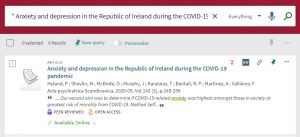
When searching for a specific title or phrase simply use quotation marks “to surround your phrase or title” For examples see below.
- Combined search terms and “phrase”
Note – You can combine both words and phrases within the Simple search box.

- Specific title using “quotation” marks
For further information on Advanced Searching, please refer to the Library Guide • How to Conduct an Advanced Search
For further information on searching techniques, including Boolean operators, parenthesis, and wildcards, please refer to the Library Guide • Searching Techniques
References
Ex Libris. (2021). Performing Basic Searches in Primo VE. https://knowledge.exlibrisgroup.com/Primo/Product_Documentation/020Primo_VE/Primo_VE_(English)/150End_User_Help/01Performing_Basic_Searches_in_Primo_VE#Grouping_Terms_Within_a_Query
The Cairnmillar Institute Library Guide How to Conduct a Simple Search was created 22 November 2021 and is accurate as at 6 January, 2022.