Before beginning your search Sign into the Library catalogue. For further information on how to Sign in, please refer to the Library Guide • Signing into the Library
In general, searches within the library catalogue (Primo) are not case sensitive, and all terms and words entered will be searched unless parenthesis and Boolean operators, such as AND OR Not are used.
The Advanced search function is useful in allowing you to select filters prior to searching, utilise Boolean Operators as well as allowing you to allocate criteria that are not available when conducting a Simple Search.
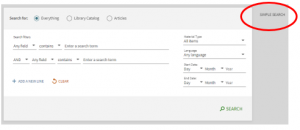
To access the Advanced search function, click on Advanced Search

The Advanced Search box contains several fields, options, and functions to select, as well as an option to return to the Simple Search homepage
Key components contained within the Advanced Search are:
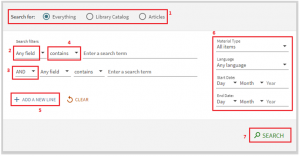
- Search For – This allows you to search across everything in the Cairnmillar Library catalogue including open access resources, or items only held within the Cairnmillar Library or only for articles.
- Any Field – This option can be enabled for every search line you add. It allows you to search within all search fields or narrow the search to a specific field, such as Title, Author/Creator, Subject or ISSN.
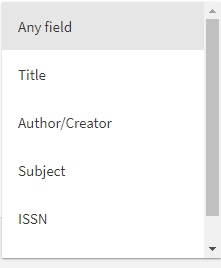
- Boolean Operators – AND, OR, NOT. This option can be enabled for every search line you add.
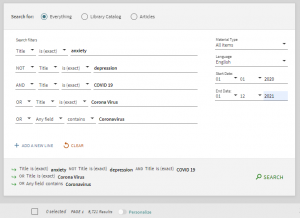
- AND – Narrows your search and will retrieve results that contain only those words. For example, anxiety AND depression will not return results with only one of the defined terms.
- NOT – Limits your search and can be used to exclude terms from your results. For example, COVID 19 OR corona virus OR coronavirus, will return results that include one or all of these terms. OR is best used when there may be more than one word for the same meaning.
- OR – Expands your search and will retrieve results that include one or more of the defined terms. For example, COVID 19 OR corona virus OR coronavirus, will return results that include one or all of these terms. OR is best used when there may be more than one word for the same meaning. For example, anxiety NOT depression, will only retrieve results that include anxiety and will not include any results with the term depression.
- Contains – This option can be enabled for every search line you add. It allows you to search and retrieve results for all terms included, however the terms may be in a different order and not next to each other.
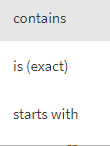
Using the drop-down arrow, you can further filter your search by selecting:
Is (exact) – Will retrieve results where phrases contain terms which exactly match the terms specified in the search.
Starts with – Will retrieve results that contain terms that start with the specified terms entered into the query.
Note – When performing a Title search, it is recommended that you do not omit anything from the title. For example, The PTSD workbook is preferred to PTSD workbook.
- Add a New Line – Allows you to add new search criteria lines to enhance your search. There are a maximum of seven additional lines you can add.

- You can further filter on the left hand-side of the Advanced Search box and select:
Material Items – Will search across all item types, or you can select specific materials such as Books, Journals, Articles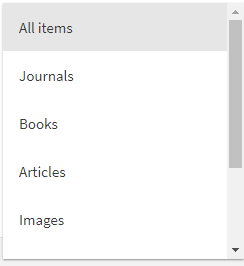
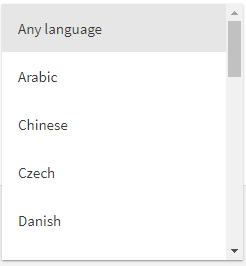
Language – Will search across any language or you can select a specific language
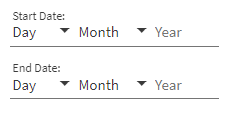
Start Date – Will search across the entire date range of all items and resources held within the collection. Or you can select a specific date range to further arrow your search and retrieve more recent result.
- Once you are happy with your Advanced Search click the search button to retrieve results.

An example of an Advanced Search utilizing options and functions available is below:
For further information on Searching Techniques including searching with wildcards, parenthesis and using special characters, please refer to the Library Guide • Searching Techniques
References
Ex Libris. (2021). Performing Advanced Searches in Primo VE. https://knowledge.exlibrisgroup.com/Primo/Product_Documentation/020Primo_VE/Primo_VE_(English)/150End_User_Help/02Performing_Advanced_Searches_in_Primo_VE
The Cairnmillar Institute Library Guide How to Conduct an Advanced Search was created 22 November 2021 and is accurate as at 6 January 2022.