In order to check your Personal Details, you will need to access your Library card. For further information on Accessing your Library Card, please refer to the Library Guide • Accessing your Library Card
Personal Details
Once signed into your Library card you can check your details are accurate by clicking into the Personal Details tab in your Library card.

NOTE – In order to receive any notifications from the Library such as, request fulfillments, reserves, overdue notices and loan information, you will need to ensure the email address under the My email option is your Cairnmillar email address.
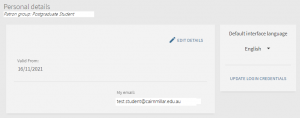
Please contact the Library if your email address is missing, or incorrect.