The aim of this document is to provide a guide for Academics, Teaching Staff and students on the permalink function of Primo.
To begin either conduct a Simple Search or Advanced Search in the Library Catalogue to locate the required item.
- Before beginning your search Sign into the Library catalogue. For further information on how to Sign in, please refer to the Library Guide • Signing into the Library
- For further information on Advanced Searching, please refer to the Library Guide • How to Conduct an Advanced Search
- For further information on Simple Searching, please refer to the Library Guide • How to Conduct a Simple Search.
Permalinking
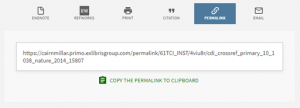
Once you have located the item from the results page click into the item and scroll down to the VIEW ONLINE options and click on the PERMALINK symbol.
Click on the COPY THE PERMALINK TO CLIPBOARD.
Once compete you will see the SUCCESS tick. Simply paste or CTRL V to your location.
The Cairnmillar Institute Library Guide Permalinks was created 13 December 2021 and is accurate as at 18 January 2022.