In order to request items you will need to be signed into the Library. For further information on signing into the Library, please refer to the Library Guide Signing into the Library.
Requesting an Item
- Physical items are to be requested via the Library catalogue.
- If an item is on loan, your request will be placed into a queue and once the item is returned you will receive notification the item is ready for collection from the Cairnmillar Institute Library.
- Once a Request is submitted it is automatically sent to the Library Management System (LMS) and placed into a task list and queue for processing.
NOTE ON COPYRIGHT
All Cairnmillar Institute Library users accessing the Library’s resources and collection, both physical and electronic, must comply with legislative requirements, licensing agreements and copyright obligations. For further information regarding Copyright please refer to the fact sheet Copyright Information.
Requesting Items
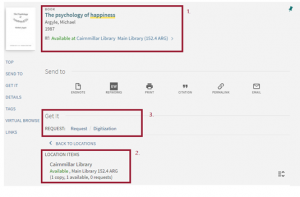
- In the above record you can see in the title information the item is a book and held with the Cainmillar Library.
- Under LOCATION ITEMS you can see there are no current requests for this title and it is available.
- Under the GET IT/REQUEST option you can see this item is able to be requested.
Request the item by clicking on the Request option:

Request
Utilising this option will allow you to request the entire book.
Selecting Request will open the below screen. Fill out the details and when finished click on SEND REQUEST:
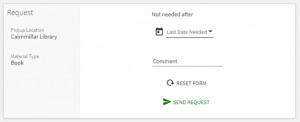
Once a request is submitted you will receive the below message and the request will appear in your Library Card activity under Requests:

Once the Request is processed you will be notified that the physical item is available for collection from the Cairnmillar Institute Library.
The Cairnmillar Institute Library Guide Requesting Items was created 13 December 2021 by The Cairnmillar Institute Library and is accurate as at 26 May 2022.